Island is a free Mac app that lives in the MacBook notch. Hover it and it opens. Scroll to see what it shows.
Hover the notch, or scroll
Your music, at a glance.
When a song starts, the island shows it for a moment and goes back to sleep. Spotify, Apple Music, YouTube in the browser: any app works.
Open it, and it plays along.
Artwork, the lyric line in time with the song, a seek bar and a visualizer that follows the real audio of your Mac.
AirPods in, battery on screen.
Left, right and case, the moment they connect. No digging through the Bluetooth menu.
Five minutes before the meeting.
Your next event drops down from the notch, with one click to join Meet, Zoom or Teams.
Small things, in one place.
Volume, brightness, keyboard light, Caps Lock, Focus, mic and camera in use: they all show up in the island instead of a grey box.
Everything a hover away.
Shelf and AirDropDrop files on the notch, pick them up later or send them with AirDrop.
Clipboard and notesThe last things you copied, a colour picker and a quick note that stays.
Calendar and remindersNext events, today's reminders, and a line to add a new one.
WeatherNext twelve hours and the coming days, from the same page.
Volume per appTurn Chrome down without touching Spotify, with a five-band equalizer too.
System stats and controlsCPU, memory, disk and network, Wi-Fi, Bluetooth, timers and keep awake.
Make it yours.
This is the real settings window, in Italian like the app. Switch sections, flip the switches, drag the equalizer: it works here just as it does on the Mac.
Island
Generale
Quando parte Island e come si apre.
AVVIO
Apri Island all'accessoParte da sola quando accendi il Mac
Mostra l'isolaNascondila se ti serve tutta la barra dei menu
APERTURA
Apri al passaggio del mouseSe spento: clic sul notch o due dita verso il basso
Apri dopoQuanto deve restare il mouse sul notchSubito ⌄
Aspetto
Come si vede l'isola, aperta e chiusa.
ISOLA APERTA
Stile
Dimensione
Animazioni
ISOLA CHIUSA
Meteo accanto al notchTemperatura della tua zona (Open‑Meteo)
Batteria accanto al notchLivello e ricarica del Mac
Musica
Brano in riproduzione da qualsiasi app.
Sorgente
Automatica mostra l'app che sta suonando. Scegline una per vedere solo quella.
Testi delle canzoniSpenti, Island non li mostra da nessuna parte e non li scarica
Testo della canzone sotto il notchRiga per riga anche a isola chiusa, da lrclib.net
Audio
Uscita ed equalizzatore.
Uscita💻 Altoparlanti MacBook ⌄
EqualizzatoreCinque bande, per tutto il Mac o per un'app
Sub60 Hz
Bassi250 Hz
Medi1 kHz
Presenza4 kHz
Aria12 kHz
Blocco schermo
Cosa vedi a Mac bloccato.
Widget sulla schermata di bloccoBrano con comandi, batteria, meteo e prossimo evento
MUSICA
Copertina grandeCome sull'iPhone: copertina verticale e player in vetro sotto l'ora
Sfondo dalla copertinaTutto lo schermo prende la copertina del brano, in alta qualità
Testo della canzoneLa riga in corso sotto la copertina
Schermo acceso mentre ascoltiLo schermo bloccato non si spegne finché suona la musica
Avvisi
Cosa compare nell'isola.
Sostituisci l'HUD di volume e luminositàI tasti mostrano solo l'isola
Animazione di sbloccoUn lucchetto che si apre nel notch quando sblocchi il Mac
Download completatiAvviso quando un file arriva in Download
Permessi
Tutti facoltativi: Island funziona anche senza.
Registrazione audioPer il visualizzatore e l'equalizzatore●
AccessibilitàPer i tasti di volume e luminosità●
CalendarioPer i prossimi eventi●
Island
Versione 2.4
AggiornamentiIsland controlla da sola ogni 6 oreControlla ora
Codice tuo, nessun account, nessuna telemetria.
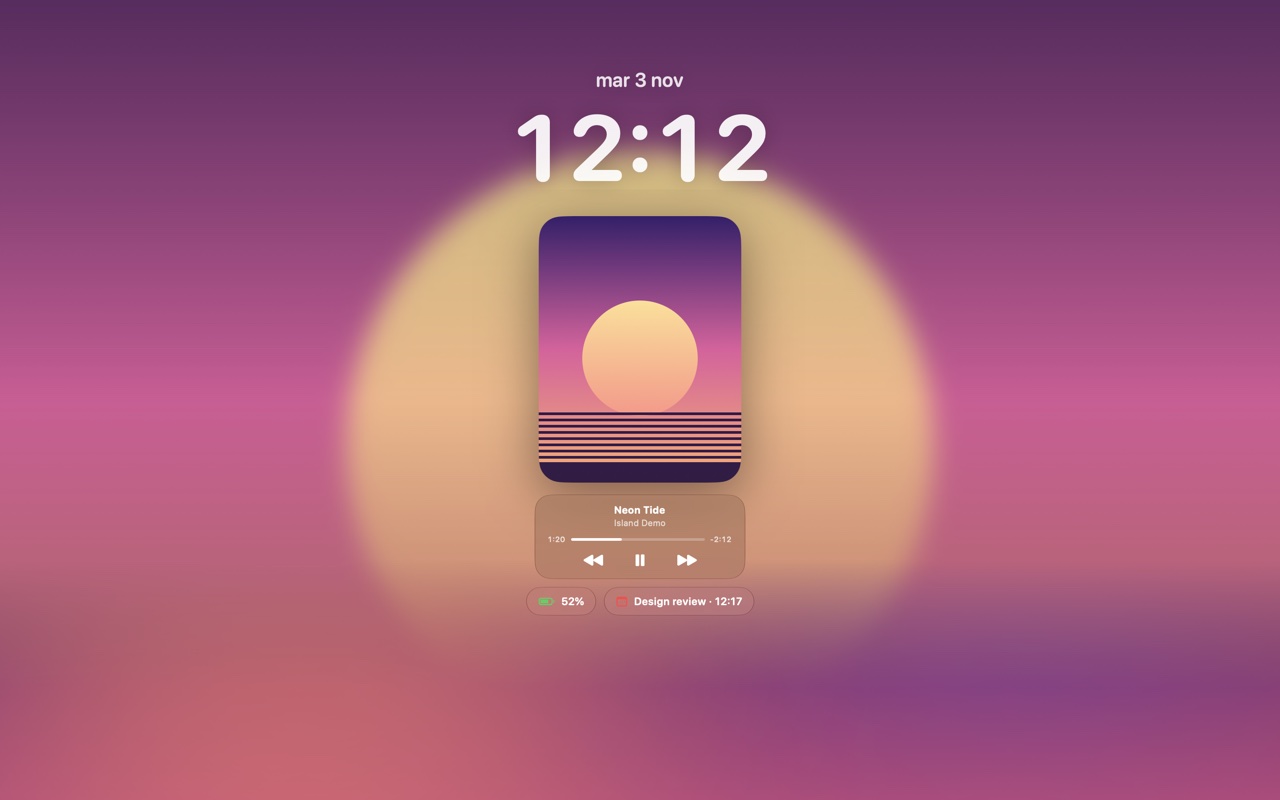
A lock screen like your iPhone.
While music plays, the whole lock screen takes the album artwork in high resolution, with a tall cover, a small glass player and the current lyric line. It stays on while you listen.
 Island